WFC Control
One platform.
Every operation.
The only platform that seamlessly manages schedules for Security Guarding and Mobile Security services. Streamline scheduling, tasking, and live reporting all in one intelligent platform.
Security operations content, built around the work your team delivers
Explore the WFC Control workflows that connect scheduling, patrol activity, incident reporting and client-ready service records.
Incident reporting and digital occurrence books
Create a clearer route from field report to supervisor review and client update.
Explore workflowMobile patrol and guard tour management
Plan routes, review checkpoint activity and handle exceptions with more context.
Explore workflowClient portal and proof of service
Organise site, patrol and incident records for controlled client visibility.
Explore workflowSmart Scheduling & Live Operations
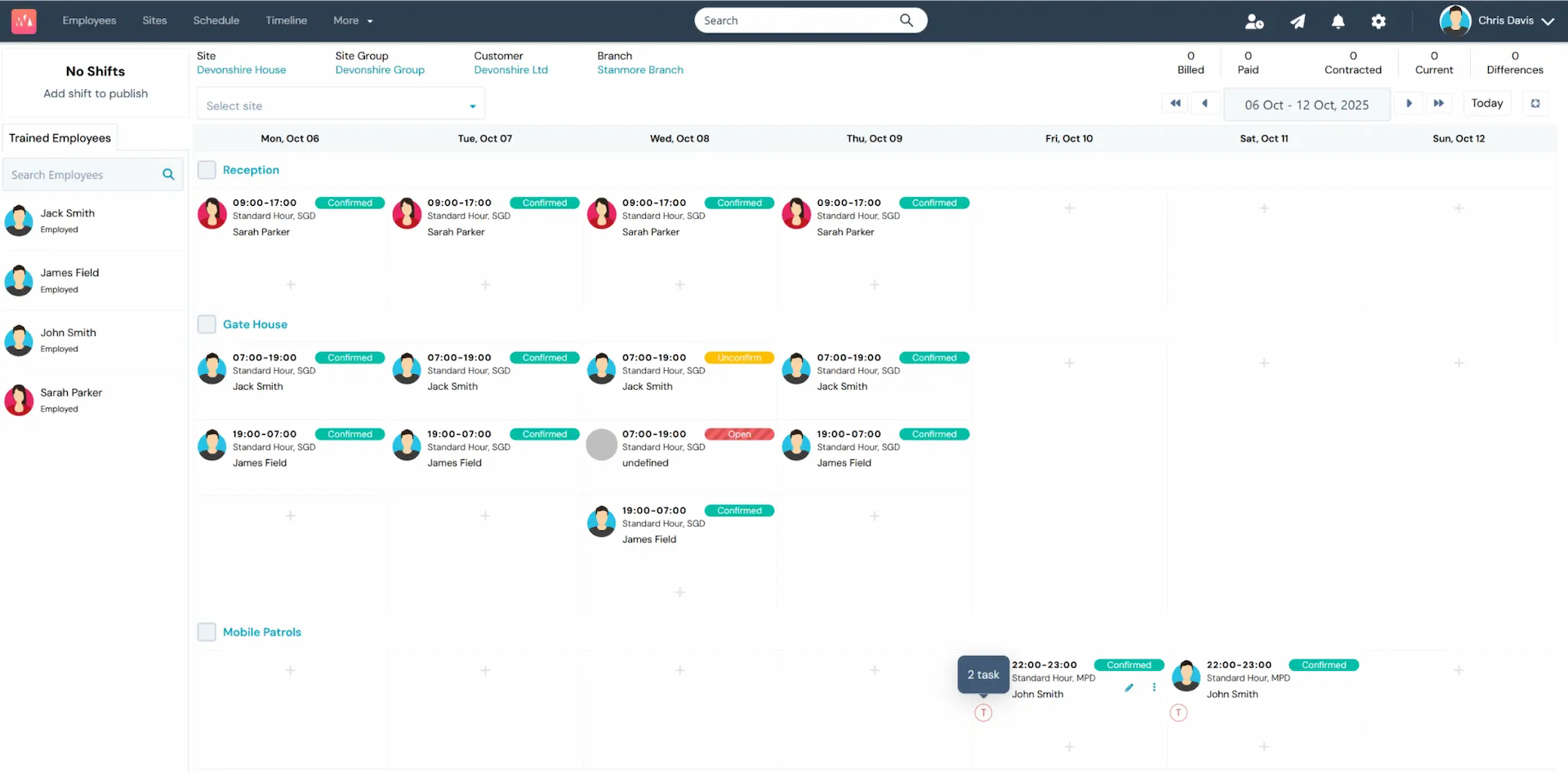
Manage all your security guarding and mobile patrol schedules from a single, intuitive dashboard. Drag-and-drop shifts, assign staff, and monitor your entire operation in real time across all sites and contracts.
- Drag & drop shift builder with instant staff assignment
- Live timeline view across all sites and contracts
- SIA licence expiry tracking with automated alerts
- Bulk Duty feature for events staff accept first-come, first-served
- Payroll-ready export to Xero, Sage, QuickBooks & more
See Your Entire Workforce.
Anywhere in the Country. In One Click.
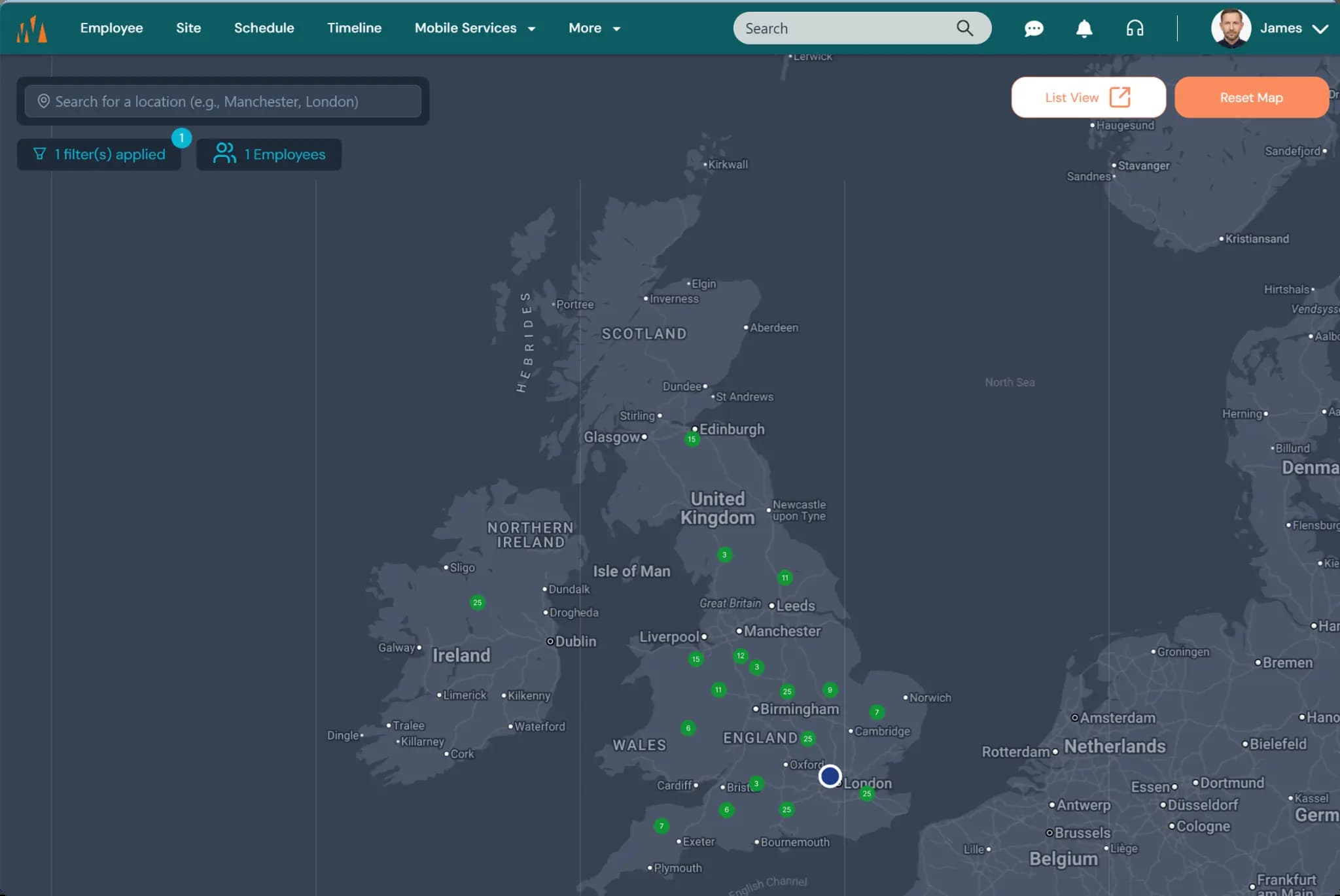
When you are presenting to a new client or preparing for a major event, nothing demonstrates your capability more powerfully than a live map of your workforce. WFC Control's Interactive Resource Map gives you an instant, filterable view of every licence holder on your system - plotted across the UK in real time.
Filter by SIA licence type, postcode radius, or availability, and within seconds you can show a prospective client exactly how many door supervisors, CCTV operators, or close protection officers you have within striking distance of their venue. It is the most compelling sales tool a security company can have in a client meeting.
- Full UK map view: see every employee plotted by home location
- Filter by SIA licence type: Door Supervisor, CCTV, Close Protection and more
- Postcode and radius search: instantly find resource near any venue
- Live headcount badge per cluster: know your strength at a glance
- One-click List View to export filtered results for event planning
- Ideal for client presentations, event bids, and rapid deployment planning
Security Operations That Stay Clear Under Pressure
WFC Control brings guard schedules, patrol activity, site tasks and incident updates into one practical operations workspace. It helps control-room teams see what is happening and take the next step without chasing information across disconnected systems.
Operations teams need a system that supports practical change when cover moves, an officer is unavailable, or a client needs a different mix of licence holders. WFC Control keeps the operational view focused on the shift, the site and the work that must be completed.
Use WFC Control for day-to-day scheduling, patrols, tasking, live reporting and client-ready service evidence. For the connected WFC360 product overview, including the workforce preparation work that happens before deployment, explore how WFC Control and WFC Verify work together.
Make operations easier, not harder.
The right system should remove repeat work and give the operations team a clear next step. When a shift changes, an officer is unavailable, or a licence needs attention, the team should be able to act quickly without navigating a complicated chain of screens.
Built around the pace of a real operations team
Security operations rarely follow a neat, predictable timetable. A client can request extra cover, an officer can call in sick, or a last-minute event can need a different mix of licence holders. Software should help the team see the impact, make the change and keep the right people informed. It should not turn a straightforward operational decision into a time-consuming administrative task.
Some operations systems are packed with complex workflows that look impressive in a demonstration but slow people down when the pressure is on. If an operations manager has to enter the same information twice, chase records across several modules or rely on workarounds to complete a simple change, the system is adding work instead of taking it away. WFC Control is designed to keep the operational workflow practical, clear and easy to adopt.
One operational view
Keep shifts, patrol activity, site tasks and incident updates easier to follow.
Clear next actions
Give teams visibility of what needs attention so priorities are easier to manage.
Client-ready service evidence
Maintain clear operational records, timestamps and documents for controlled client reporting.
Build a Task Library. Deploy to Any Site. Track Everything.
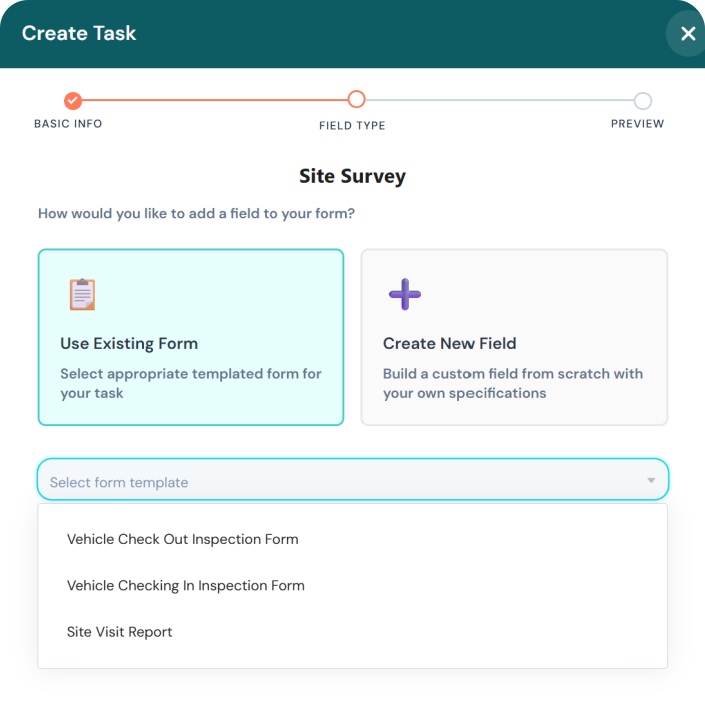
Create reusable task templates in the Task Library and assign them to any site with a single click. Each task includes GPS-precise location, scheduled time windows, priority levels, and custom form fields, so officers know exactly what to do, where, and when. All responses are captured in the app and stored for audit.
- Task Library - build reusable templates, deploy to multiple sites instantly
- GPS-precise task locations with scheduled time windows
- Priority levels: High, Medium, Low, with automatic overdue alerts
- Custom form fields: text, photo capture, digital signatures, dropdowns
- Live incident reporting with automatic timestamps
- Complaint register with real-time tracking
- All task responses securely stored and instantly available for audits
Manage Every Mobile Patrol Service In-House or Outsourced Managed From One Platform.
WFC Control's Mobile Services module handles your entire mobile patrol operation. Dispatch in-house drivers or outsourced contractor suppliers from the same screen. Schedule recurring patrols, assign duty types, and receive GPS-verified inspection reports automatically - no phone calls, no paper logs.
- Duty types: Lockup, Unlock, Alarm Response, Guarding
- One-off and recurring scheduled patrols - set specific days of the week
- Dispatch In-House or to a named Supplier contractor - same workflow
- GPS-verified arrival and departure for every visit
- Assign a report template per duty type - standardised inspection reports
- Priority levels per task: High, Medium, Low
- Overdue task alerts - OPEN, OVERDUE, COMPLETED, CANCELLED status tracking
- Inspection reports automatically shared with clients via customer portal
Oxford 123, OX12 3LJ
We Work PLC - Lockup
Oxford 456, OX5 5GH
We Work PLC - Alarm Response
Demo Mobile Site 1, ST6 2EH
Demo Customer - Guarding
Keyholding and Alarm Response Software Built Into Your Operations.
WFC Control's keyholding and alarm response module lets you manage out-of-hours callouts, dispatch mobile officers to alarm activations, and maintain a full digital key register - all from the same platform you use for scheduling. No separate system required.
- Alarm response callout dispatch - assign the nearest available officer instantly
- Keyholding duty type with digital key register and audit trail
- GPS-verified arrival and departure for every alarm response visit
- Automated proof of attendance reports shared with clients via portal
- Out-of-hours callout scheduling - one-off and recurring alarm response tasks
- Real-time officer location tracking during alarm response
- Incident report submission from the field with photos and timestamps
- Client notification on officer arrival and departure - no phone calls needed
Regent Street Office, W1B 4EA
Alarm Response - Intruder Alert
Canary Wharf HQ, E14 5AB
Keyholding - Lockup
Manchester Depot, M1 2JH
Alarm Response - Fire Alarm
Everything Your Field Staff Need, In Their Pocket.
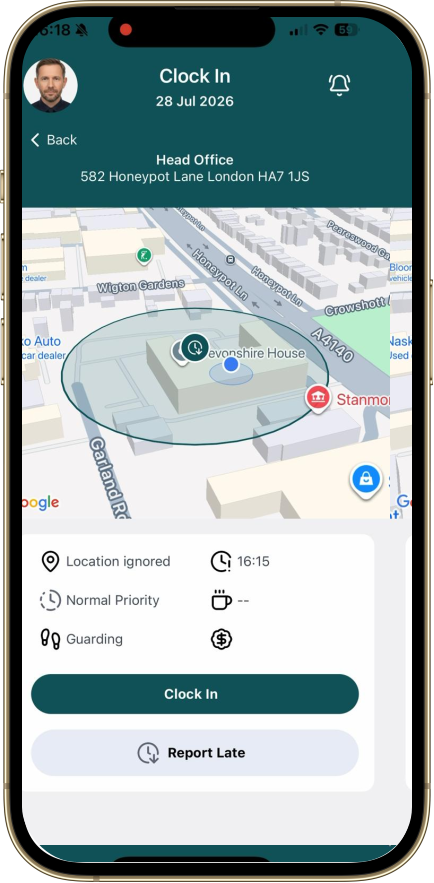
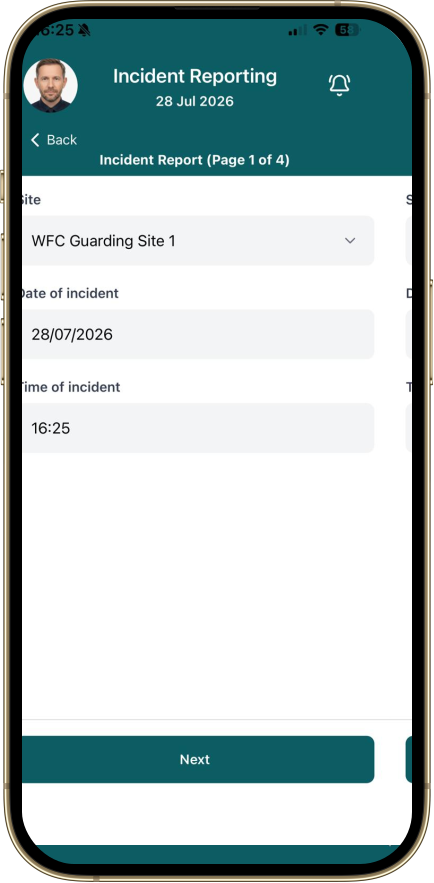
The WFC360 app provides all features your field staff would ever need - from booking on/off duty to submitting incident reports, completing tasks, and receiving live announcements. Available on iOS and Android.
- Book on/off duty with GPS verification
- Receive and complete custom tasks with forms
- Submit incident reports with photos and timestamps
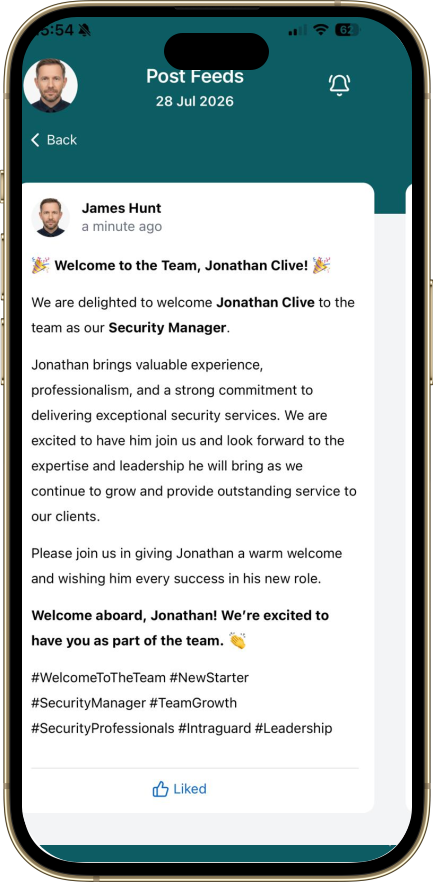
- View live announcements and notifications
- Sign site documents digitally in the field
- Live notification alerts for shift changes and lateness
Your Team Stays Informed.
Instantly.
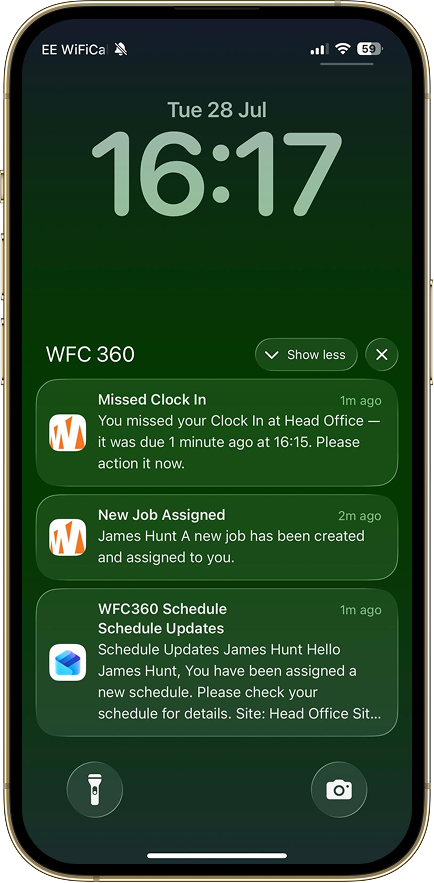
WFC Control pushes real-time alerts directly to your staff's phones the moment something changes. Missed clock-ins, new job assignments, schedule updates - every notification lands in seconds, not minutes.
- Missed Clock-In Alerts
Instant push notification when an officer fails to book on at the scheduled time.
- New Job Assignments
Staff receive immediate notification the moment a new shift or task is assigned to them.
- Schedule Updates
Any change to a shift or patrol route is pushed to the officer's device automatically.
- Customisable Notification Levels
Control which events trigger alerts and who receives them - by role, site, or individual.
Every Officer Carries Their ID.
Always Up to Date.
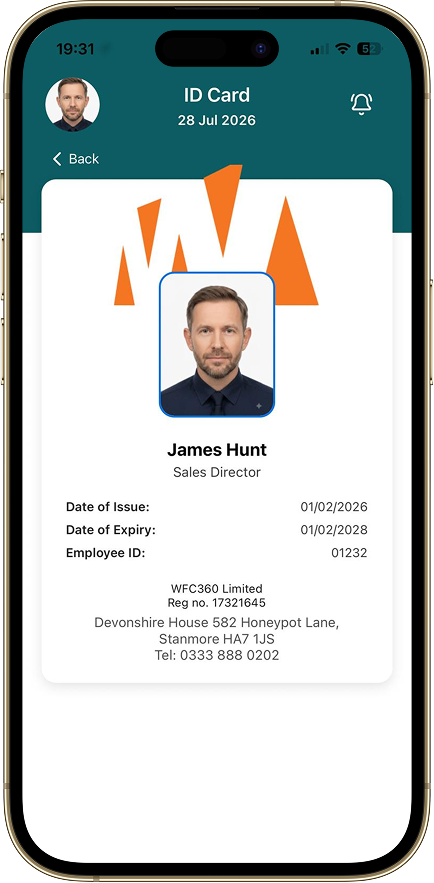
Ditch the plastic. WFC Control generates a digital ID card for every employee, accessible directly from their phone. No printing, no laminating, no chasing expired cards - just a live, always-current ID that renews automatically.
- No More Expired Cards
ID cards carry an issue and expiry date. Managers are alerted before expiry - no more compliance gaps.
- Instant Issuance
New starter joins today? Their digital ID is live in the app the moment their profile is created.
- Zero Printing Costs
Eliminate the cost and waste of physical ID card printing, replacement, and postage entirely.
- Always in Their Pocket
Officers access their ID card from the WFC360 mobile app - no card to lose, forget, or damage.
Save on every ID card, every year
Traditional ID cards cost money to print, post, and replace. With WFC Control, digital ID cards are included - no extra charge, no hidden costs.
Access Control Integration
Coming SoonSoon, your staff's digital ID will do more than identify them - it will let them in. We're building native integration with access control systems so a single tap of the WFC360 app grants entry to secured sites, replacing physical fobs and swipe cards entirely.
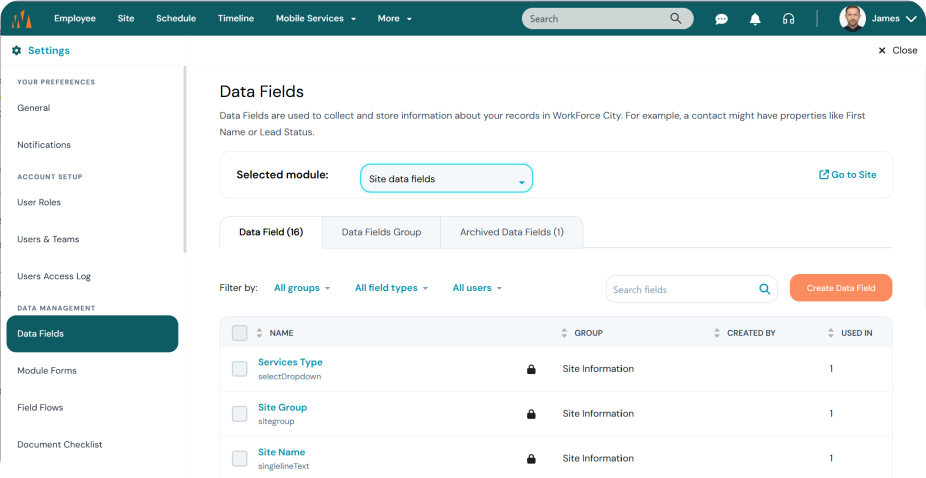
Build Your Own Workflow. No Coding Required.
Design your own fields at Employee, Customer, or Site level with the intuitive drag & drop editor. Capture exactly the data your operations need - fields appear in the mobile app automatically.
- Custom fields at Employee, Customer, and Site level
- Drag & drop field editor - no coding required
- Text, number, date, dropdown, and file upload fields
- Fields automatically appear in the mobile app
NFC & QR Code Patrol System with Live Geo-Location
Deploy NFC tags or QR codes at checkpoints across your sites. Each scan is timestamped and paired with reported GPS context, helping supervisors review patrol progress on a real-time map.
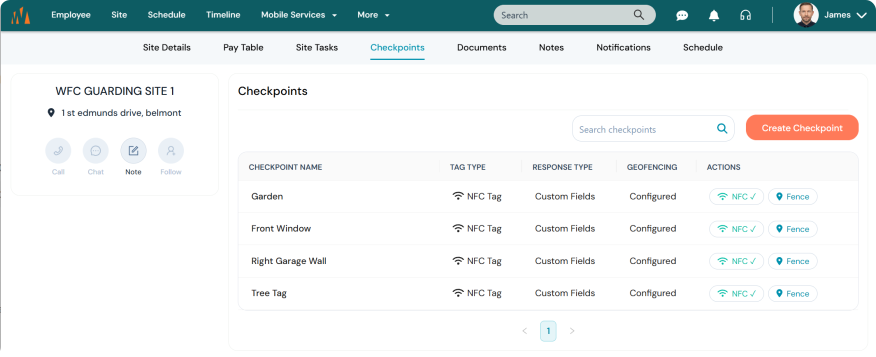
Configure at Site Level
Set up checkpoints from WFC Control or the manager/supervisor mobile app. Name each point, choose QR Code or NFC Tag, attach a custom response form, and set a geo-fence radius - all from the site's Checkpoints tab.
Scan & Verify on Mobile
Guards scan the tag on arrival. Each scan is timestamped and GPS-verified in real time. Supervisors get instant visibility of patrol progress across all sites from the live dashboard.
Share Patrol Reports with Clients
Generate professional patrol reports as PDF or share them directly with your client through the customer portal - giving customers real-time visibility of their site coverage without a phone call.
Custom Checkpoint Forms
Attach bespoke response forms to any checkpoint - fire exit checks, equipment inspections with photographs, visitor logs. Use an existing template or build new fields from scratch for each location.
Built for clearer checkpoint evidence
Every NFC tag and QR code has a configurable geofence radius. If a reported scan falls outside the checkpoint's configured area, WFC Control can flag it for operational review.
Everything You Need to Run Your Operations
WFC Control is packed with features designed specifically for organisations that screen and vet people.
Smart Scheduling
Drag & drop shift builder with instant staff assignment across all sites and contracts.
Mobile App
iOS & Android app for field staff - book on/off, complete tasks, submit reports.
Live Incident Reporting
Instant alerts with automatic timestamps, GPS, and photo evidence. No paperwork delays.
Custom Tasking
Create tasks with GPS locations, custom forms, photo capture, and digital signatures.
Live Notifications
Instant alerts for shift changes, lateness, or missed bookings. Customisable notification levels.
Complaint Register
Log, track, and resolve complaints in real time with full transparency and accountability.
Live Announcements
Post messages to individuals, teams, specific branches, or company-wide instantly.
Live Reporting
Real-time operational reports with analytics for management review and compliance audits.
SIA Licence Tracking
Automated SIA licence expiry alerts ensure your workforce is always compliant.
GPS Verification & Live Map
GPS-verified booking on/off duty and live geo-location patrol map - see every officer's position and checkpoint history in real time.
Mobile Patrol Management
Dispatch in-house drivers and outsourced contractors for Lockup, Unlock, Alarm Response, and Guarding duties from one screen.
Secured Data
Enterprise-grade security with daily backups on Microsoft Azure cloud servers.
24/7 Live Support
Dedicated support team available around the clock at no additional charge.
Digital Document Signing
Officers and managers sign assignment instructions, site agreements, and operational documents directly from their device. Every signature is timestamped, GPS-verified, and stored securely - no printing, no chasing, no lost paperwork.
Payroll & Accounting Integrations




Export Invoicing and Payroll data directly to your accounting platform. No manual re-entry.
Simple, Transparent Pricing
Every plan includes free onboarding and data migration support.
Every plan. Every feature. No exceptions. The only difference between plans is the number of licences included.
Starter
100 employee licences included
Additional licences at £2.50/employee/month
For small operators, 1-3 sites, up to 100 staff.
- Up to 100 employees
- Shift scheduling & rota builder
- Mobile app for field staff
- SIA licence tracking
- Payroll exports
- Email support
Growth
250 employee licences included
Additional licences at £2.24/employee/month
For growing companies, 80-250 staff.
- Up to 250 employees
- Everything in Starter
- Live GPS tracking
- NFC/QR patrol checkpoints
- Incident reporting
- Client portal
Professional
500 employee licences included
Additional licences at £2.00/employee/month
For mid-size operators, 200-500 staff.
- Up to 500 employees
- Everything in Growth
- Dedicated account manager
- Custom integrations
- Multi-site management
- Priority support
Enterprise
1,000 employee licences included
Additional licences at £1.50/employee/month
For large groups, 1,000+ staff, multi-region.
- 1,000 licences included
- Every feature, no exceptions
- Bespoke onboarding programme
- API access & custom integrations
Use our pricing calculator to estimate your exact monthly cost based on your team size.
What People Say About WFC360
Asim Aziz
2 months ago
WFC Control our new scheduling systems has completely changed how we manage our security operations. Scheduling that used to take hours now takes minutes, officers book on and off…
Will Johnson
2 months ago
Work Force City is an excellent platform. The system is easy to use and understand, with extensive customisable options. Customer support with the developers is a brilliant featur…
M Safyan
2 months ago
Great app for managing my shifts. It's easy to accept jobs, clock in and out, report incidents, and keep track of my schedule. The notifications help me stay organised. Thanks for…
Why General Employee Scheduling Software Falls Short for Security Companies
Tools like Deputy, Connecteam, and Homebase are built for hospitality and retail. They do not understand SIA licences, BS7858 vetting, or keyholding operations. WFC Control does.
| Feature | Generic Tools (Deputy, Connecteam, Homebase) | WFC Control |
|---|---|---|
| Shift rota & employee scheduling | ✓ | ✓ |
| Mobile app for field staff | ✓ | ✓ |
| Time & attendance tracking | ✓ | ✓ |
| SIA licence expiry tracking | ✗ | ✓ |
| BS7858 vetting integration | ✗ | ✓ |
| Keyholding & alarm response dispatch | ✗ | ✓ |
| Mobile patrol management | ✗ | ✓ |
| Live GPS officer tracking | ✗ | ✓ |
| Security incident reporting | ✗ | ✓ |
| Supplier compliance management | ✗ | ✓ |
| Built for UK security industry | ✗ | ✓ |
Frequently Asked Questions
What is WFC Control?+
WFC Control is a workforce scheduling and live operations platform built for UK security companies. It provides drag-and-drop shift scheduling, a mobile app for field staff, live incident reporting, custom tasking, and payroll integrations with Xero, Sage, and QuickBooks.
Does WFC Control have a mobile app for security officers?+
Yes. WFC Control includes a dedicated mobile app for field staff available on iOS and Android. Officers can confirm job assignments, submit incident reports, complete custom task forms, and clock in/out with GPS verification directly from their phone.
Can WFC Control track SIA licence expiry dates?+
Yes. WFC Control automatically tracks SIA licence expiry dates for all staff and sends automated alerts before a licence expires. This prevents unqualified staff from being scheduled and helps you maintain SIA ACS compliance.
Does WFC Control integrate with payroll software?+
Yes. WFC Control integrates with Xero, Sage, and QuickBooks for payroll export. Shift data, hours worked, and overtime are exported in a payroll-ready format, eliminating manual data entry and reducing payroll errors.
Can I manage multiple sites and contracts in WFC Control?+
Yes. WFC Control is designed for multi-site security operations. You can manage unlimited sites and contracts from a single dashboard, with a live timeline view showing all staff across all locations in real time.
How does WFC Control integrate with WFC Verify?+
Once an employee has passed BS7858 screening in WFC Verify, their record can be exported directly to WFC Control with a single click. This means you only schedule vetted, compliant staff, and any licence or document updates in WFC Verify are automatically reflected in WFC Control.
Ready to streamline your operations?
Speak to our team and see how WFC Control fits your operation. We will walk you through the platform and answer every question.